


Fruit Ninja®
4.5212.72K Reviews
App Specs
- Version
- 3.96.8
- Updated On
- License
- Free
- Downloads
- 500,000,000+
- Developer
- Halfbrick Studios
- Categories
- Arcade
- Platform
- Android, iOS
Screenshots
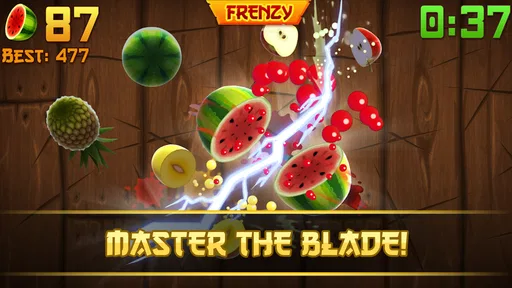
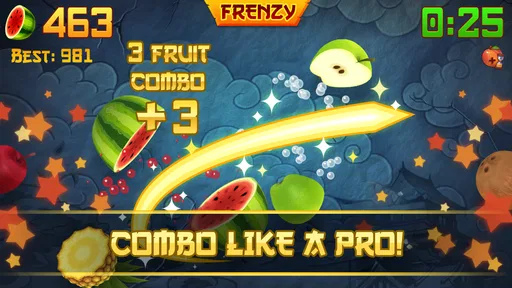

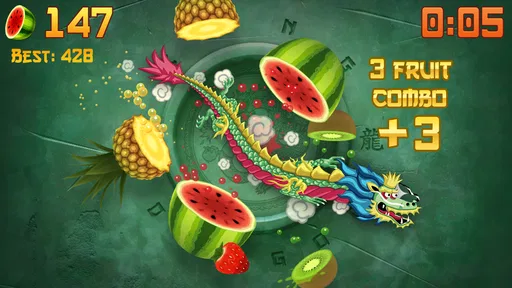
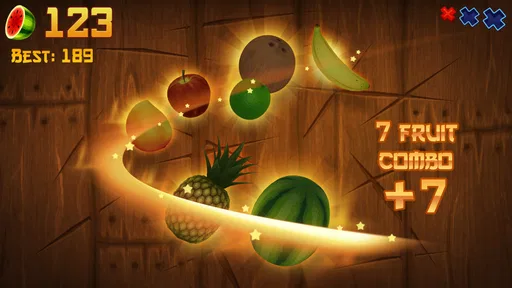
 Analysis by AppCompare
I tend to judge an arcade game by a simple question: does it feel good to play right away, and can I stop without turning a spare moment into a commitment? Fruit Ninja® answers the first part with a quick swipe and a burst of flying fruit. The appeal is immediate: spot what is moving, cut through it, and enjoy the little rush when several pieces fall to one clean gesture. It is easy to understand before you have time to overthink it, which is exactly why I find it useful for short breaks.
A quick game that earns its first few seconds
The basic interaction is unusually clear. Fruit crosses the screen, your finger becomes the blade, and the result appears instantly. There is no long setup between deciding to play and making the first cut, so I can open it while waiting for a kettle, sitting through a brief pause, or taking a breather between tasks. That speed matters: a casual game should not ask for more attention before it starts than the break itself can offer.
The pleasure is tactile even though I am only moving a finger across glass. A swipe can catch several pieces, and seeing the fruit split in one motion makes a small action feel rewarding. The response is direct enough that I can tell when a cut worked, rather than wondering whether a complicated control or menu caused a miss. This is a good fit for someone who wants an arcade game with almost no learning curve.
Guides and Analysis on Fruit Ninja®
How the session rhythm changes
What keeps the simple idea from feeling completely flat is the way the modes ask for different moods. Classic is the more watchful option: I need to keep slicing while avoiding bombs, so every tempting swipe has a little risk attached. Zen takes away that bomb pressure and suits a calmer stretch when I want the motion without the same penalty for getting carried away. Arcade brings a busier pace, with special bananas that can double points, freeze time, or send more fruit into the action.
I like that these choices let me match the game to the time I have. If I am only checking whether I still have a steady hand, a short Classic run gives me a clear challenge. If I want a less tense pause, Zen makes more sense. Arcade is the one I reach for when I want a louder burst of activity rather than a quiet reset. The important trade-off is that the more hectic option can feel less relaxing, even though it is still easy to start.
Simple controls, with a little room to improve
Swiping is easy to pick up, but playing well is not only a matter of moving faster. I get more value from watching where fruit is gathering and waiting until one controlled line can catch several pieces. Chasing every individual item makes my hand busy without necessarily making my run better, and broad, careless movements can be risky in Classic when a bomb is among the targets. A patient swipe can be more useful than a frantic one.
That distinction gives the game a modest skill curve. A new player can enjoy the basic slicing immediately, while someone who has played before can focus on timing, positioning, and avoiding unnecessary gestures. I would not call it a deep strategy game, but the difference between a deliberate swipe and a panic swipe is enough to give repeat attempts a purpose.
Worth Reading Before You Choose

Switching to Android Auto Means Rethinking Your Driving Routine

Google Calendar Makes a Crowded Week Easier to Manage

Ludo King Makes the Most of the Minutes Between Plans

Baby Panda World Brings Quick Play to Modern Phones, but Its Game Library Feels Busy

ESPN’s Live Game View Makes Following Close Games Easier

QuizzLand Review: A Good Fit for Short Trivia Breaks, Not Every Player
What happens when I put it down
One of the best qualities here is that a run does not require me to settle in for a long session. I can play briefly, leave, and come back later without needing to remember a story or a complicated chain of objectives. That makes it easier to fit around ordinary interruptions than an arcade game built around a long level or a continuous campaign.
There is still a small attention cost while a round is underway. In Classic, looking away at the wrong moment can mean missing fruit or making a bad swipe, so I would not start a run while I need to answer a message or watch for an announcement. The game is easy to return to after a pause, but it is not necessarily ideal to play through every interruption. I treat each attempt as a self-contained little burst and choose a moment when I can give the screen a few focused seconds.
Repetition, replay value, and its limits
Fruit Ninja is built around repeating a familiar action, and that is both its strength and its limit. The first few slices are immediately pleasing; longer-term appeal depends on whether I enjoy trying to improve a score, choosing another mode, or competing with someone. The multiplayer option adds a reason to compare skills with friends or random players, which changes the feeling from a private reflex test into a contest. It will matter more to a competitive player than to someone who is happy with a quick solo break.
For me, replay value comes from small personal goals rather than a changing premise. I might try to make cleaner swipes, avoid risky reaches, or see whether I can stay composed when the screen becomes busy. If you need a new setting, a story, or a steady stream of unfamiliar mechanics to stay interested, the core loop may wear thin. This is a game to revisit because the action is satisfying, not because every session promises a radically different experience.
How it fits among arcade games
Plenty of mobile arcade games ask for quick reactions, but many put a character on a track, fill the screen with obstacles, or build around repeated taps. This one makes the player’s own swipe the central action. I find that more direct than games where I must learn a larger control scheme, although it also means there is less variety in what I physically do. If I want an arcade game that gets moving quickly, this is a strong choice; if I want exploration or a sequence of distinct stages, another style will suit me better.
That narrow focus is why I would recommend it selectively rather than to everyone. It works especially well for casual players, for someone sharing a quick challenge with a friend, or for anyone who likes improving a small skill in short attempts. I would skip it if I dislike score-focused repetition, prefer games that can be played while my attention is divided, or want a longer progression to follow. The right expectation is a polished-feeling slice of arcade play, not a deep adventure.
Everyday use and practical choices
A realistic use for me is the ten minutes before leaving home: I can play a couple of brief rounds while waiting for someone else to get ready, then close the game without needing to pause a long level. On public transport, I would choose a moment when I am seated and able to keep my eyes on the screen; quick swipes are less convenient if I am standing or juggling a bag. The controls are simple, but the game still rewards a steady hand and a little concentration.
Another useful habit is choosing the mode before I begin rather than switching moods mid-session. Classic is better when I want a clear risk-and-reward test; Zen is the sensible pick when I want less pressure; Arcade fits when I have enough attention for a more crowded screen. That small choice helps the game serve different breaks without pretending every mode is equally relaxing. It also makes it easier to stop after the kind of run I actually wanted.
For a first-time player, I would start with the mode that matches the moment instead of treating the most intense option as the default. In Classic, make fewer, more deliberate swipes and keep an eye out for bombs before cutting through a cluster. In Zen, use the calmer pace to get comfortable with the movement. When Arcade feels hectic, that is a cue to enjoy the burst rather than chase every fruit. These are simple adjustments, but they make the controls feel more manageable.
Who should choose it—and who may not
Halfbrick Studios has made an arcade game that is easy to recommend to someone who wants a quick, hands-on diversion. It is also a reasonable choice for younger players: its content rating is Everyone, and the fruit-slicing premise is playful rather than built around a complicated theme. The game is free to download, though in-app purchases range from $0.99 to $179.99 per item. I would keep that range in mind if a child will be playing, and check purchase settings on the device rather than assuming that a free download means every option is free.
The store’s average rating is 4.5 from around 5.4 million ratings, and the game has been installed over 500 million times. Those figures suggest it has reached a very broad audience, but they do not change the basic question for an individual player: do you enjoy repeating a short reflex challenge? I would not choose it as my main game if I need a longer narrative, careful planning, or meaningful progress every time I open an app. Its appeal is concentrated in the immediate action.
There is also a practical distinction between playing alone and playing for comparison. Solo sessions are the easiest way to dip in and out, while multiplayer can make a familiar round more compelling if friendly competition motivates you. If you do not care about scores or contests, that feature is unlikely to transform the experience; the slicing itself needs to be enjoyable. I find that honest test useful before deciding whether to keep returning.
Version, cost, and a sensible expectation
The current version is 3.93.2, and the game dates back to July 20, 2011. Its longevity makes sense to me because the central gesture is still easy to understand, but age alone is not a reason to expect a constant stream of novelty. The minimum operating system is Android 6.0, so it is worth checking device compatibility before downloading. I would approach it as an established arcade staple whose main draw is a familiar, well-defined loop.
Because the game is free to start, trying it does not require paying upfront. The purchase range is broad, so I would decide whether customization or optional extras matter to me before spending anything. The core reason to install it should be the quick swiping challenge, not the assumption that purchases are needed to make the basic idea enjoyable. If I am only curious, I can begin with the free experience and see whether I actually return to it.
My casual verdict
If you've ever found yourself slicing through air in a fit of ninja-like enthusiasm, then Fruit Ninja® is the app that might just make your day. I recently took a dive into this juicy game, and let me tell you, it was a slice of fun! Let’s get into the nitty-gritty of what makes this game so addictively satisfying.
When you first open Fruit Ninja, you're greeted by an upbeat and colorful interface that draws you right in. The concept is simple yet genius: slice as many fruits as possible while avoiding bombs. It’s one of those games that seems easy in theory, but once you’re in the thick of it, your reflexes are put to the test.
The controls are intuitive—just swipe your finger across the screen to cut through flying fruits. The more fruits you slice in one swipe, the higher your score, and believe me, those combos are oh-so-satisfying! Each level offers a fresh challenge, keeping you on your toes and your fingers moving.
Fruit Ninja offers several game modes to keep things interesting. Classic mode is where it all begins, with the challenge of slicing fruits and avoiding bombs. Then there’s Zen mode, perfect for those who want a more relaxed slicing experience without the worry of bombs ruining your streak. Arcade mode adds a fun twist with special bananas that can give you a double score, freeze time, or trigger a frenzy of fruits. It’s a wild ride!
One feature I found particularly intriguing is the multiplayer mode. You can challenge friends or random players from around the world to see who has the sharper skills. It adds a competitive edge that’s both thrilling and nerve-wracking.
The graphics in Fruit Ninja are vibrant and crisp, perfectly capturing the juiciness of the fruits. Each slice is accompanied by a satisfying splatter of juice, which adds to the visceral feel of the game. The sound effects are equally satisfying, with the whoosh of your blade and the splat of the fruits enhancing the overall experience.
The background music is upbeat and energizing, keeping you pumped as you slice away. It’s a small detail, but it makes the game all the more immersive.
Now, let’s talk about the in-app purchases. While the game is free to download, it does offer a variety of purchases to enhance your gameplay. You can buy new blades and dojos, each with unique effects that can boost your score. Though not necessary to enjoy the game, they add an extra layer of fun for those looking to customize your ninja experience.
There's also a subscription option called the Starfruit Club, which provides daily bonuses and exclusive content. It’s a nice touch for those who find themselves deeply invested in the game.
Overall, Fruit Ninja is a delightful game that offers endless entertainment. Whether you’re looking to kill a few minutes or dive into a longer session, it’s a game that delivers on all fronts. The combination of simple mechanics, vibrant graphics, and varied game modes make it a standout in the casual gaming world.
So, if you haven’t yet, give Fruit Ninja a try. You might just find yourself addicted to the sweet satisfaction of slicing through virtual fruits. And remember, keep those fingers nimble and your mind sharp—this game is as deliciously challenging as it is fun!
Pros
- Addictive and satisfying gameplay.
- Simple controls
- easy for all ages.
- Vibrant and colorful graphics.
- Frequent updates with new features.
- Multiplayer mode for competitive fun.
Cons
- In-app purchases can be costly.
- Repetitive gameplay over time.
- Ads can be intrusive at times.
- Limited offline play options.
- Some features require internet.
FAQs for Fruit Ninja®
What is Fruit Ninja and how do I play it?
Fruit Ninja is a fun and addictive arcade game where you slice fruits flying across the screen using swipes as your sword. The aim is to slice as many fruits as possible while avoiding bombs, which can end your game. It's a simple yet challenging game that tests your speed and precision.
Is Fruit Ninja available for both Android and iOS devices?
Yes, Fruit Ninja is available for download on both Android and iOS platforms. You can find it on the Google Play Store for Android devices and the Apple App Store for iOS devices. This ensures broad accessibility for users across different mobile systems.
Are there any in-app purchases in Fruit Ninja?
Fruit Ninja offers in-app purchases that allow players to buy additional content or power-ups, which can enhance the gaming experience. These purchases are optional, and the game can be enjoyed fully without spending any money. Be mindful of these options if children are playing.
Does Fruit Ninja require an internet connection to play?
Fruit Ninja does not require a constant internet connection to play, making it ideal for offline gaming. However, an internet connection might be necessary for updates or accessing certain features like leaderboards and in-app purchases.
What age group is Fruit Ninja suitable for?
Fruit Ninja is suitable for a wide age range, from young children to adults. The game’s simple mechanics and lack of violent content make it family-friendly. However, younger players should be guided regarding in-app purchases to ensure they don't make unintended transactions.


